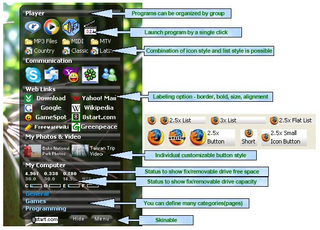
Application launchers are designed with one goal in mind: to help you access your favorite applications faster. In the computer age, seconds are an eternity. Milliseconds are todays seconds. Shaving a mouse-click or two off the process of finding and opening an application is what these things are about. Enter 8Start.
8Start is a freeware application launcher that puts your most-used applications at your fingertips. It does this by bringing up groups of buttons with a simple mouse or keyboard sequence which you specify in the setup. The buttons appear immediately underneath your mouse.
8Start takes a few minutes to configure, but promises to give you back those minutes and more as you use it. (The application was developed by a non-English speaker, so don't be put off by the grammatical errors on the web site. They program is solid and well designed.)
8Start Download Page
[via CyberNet]
Barry's Best Computer Tips is updated several times every day; the easiest way to get your daily dose is by subscribing to our news feed. Stay on top of all our updates by subscribing now via RSS or Email.

