Showing posts with label computers. Show all posts

Sunday, October 12, 2008

NODEVICE.com - One-stop shopping for device drivers


Not that you have to pay anything. Nodevice.com has a "massive collection of drivers from all the major manufacturers," so you won't have to go all over the Interwebs to find what you need.

NODEVICE.com

Barry's Best Computer Tips is updated often; the easiest way to get your regular dose is by subscribing to our news feed. Stay on top of all our updates by subscribing now via RSS or Email.

Sunday, September 30, 2007

What's Next in the World of Computing?

Future of Computing

Cordless power, zero-ink printing, flexible displays in the near-term, gigabit Internet and probe storage a few years further out. This is according to an informative and intriguing article on PCWorld.com. Can the flying cars be that far behind? Hey, forget about flying cars, will you?

Source article.

Barry's Best Computer Tips is updated often; the easiest way to get your regular dose is by subscribing to our news feed. Stay on top of all our updates by subscribing now via RSS or Email.

PPP Direct

Sunday, September 16, 2007

Get Windows Se7en Wallpaper

Windows Se7en Wallpaper

If you happen to be in love with the latest and greatest anything, you will definitely want to be the first kid on your block to have Windows Seven wallpaper on your desktop screen. Formerly codenamed Blackcomb, then Vienna, Windows Se7en is supposed to be the name of the next version of Windows, due out in 2009 or 2010. Whether or not it has anything like the look of this wallpaper, the look is quite stunning.

Windows Se7en Wallpaper

[via JohnTP]

Barry's Best Computer Tips is updated often; the easiest way to get your regular dose is by subscribing to our news feed. Stay on top of all our updates by subscribing now via RSS or Email.

Sunday, April 08, 2007

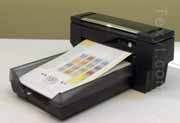
The Amazing 60-Pg/Min Color Inkjet

You have to see this video to believe it. According to TEXYT, a company called Silverbrook Research recently unveiled "astounding videos of desktop, photo and wide-format printers that print pages and photos 5 to 10 times faster than products from current printer market leaders HP, Canon, , a company called SilverbrookEpson and Lexmark."

They claim that the technology will show up in products in late 2007, beginning with a 100mm printhead for home and retail photo printing. The company expects the printers to eventually retail for $200 or less.

Click here to see the video. Truly mind-blowing.

If you enjoyed this post, take a few seconds of your time and subscribe to our feed! Barry's Best is updated daily!

Best Geek Gift Ever!

Is there someone you know (like yourself maybe?) who's such a tech-nerd-geek nose-picker loser that they love absolutely anything that has to do with technology? I've found the perfect geek-gift for them. Check it out.


If you don't get it, you are clearly not a tech-nerd-geek nose-picker loser. Good for you. But you are a computer-illiterate. Google it!!

You can get it here.

If you enjoyed this post, take a few seconds of your time and subscribe to our feed! Barry's Best is updated daily!

YouTube, the Easy Way

So, you want to put yourself, or your friends, or your enemies, on YouTube. You could use an expensive camcorder and go through the hassle of uploading to your video editing software, editing, etc. If you want to get down and dirty, you can't beat the $50 Digital Blue American Idol Digital Camcorder, or the $65 Creative Live! Cam Optia. These will upload directly to YouTube when connected to your PC via USB. Check them out below:


If you enjoyed this post, take a few seconds of your time and subscribe to our feed! Barry's Best is updated daily!

Saturday, March 31, 2007

Step Aside Adobe Reader. Foxit is Here.

Depending on the current phase of your computer's life-cycle, you might be interested in an alternative to Adobe's ubiquitous Reader. In the early phase, you are swimming in an ocean of memory, storage and processing power. The applications you have installed seem lightning-fast, going from double-click to open in less time than it takes you to say "pi," assuming you would have any reason to say "pi." Your screen is covered with layer upon layer of open windows, some of which you've forgotten about completely. Life is good.

A couple of years pass, and your machine has lost its verve. It seems to have contracted chronic fatigue. It gets bogged down by any significant load. You have to conserve, you have to find ways to take up less storage on your hard drive. You say to yourself, When am I ever going to use that program? I really don't need it, do I? You are much more judicious about how many programs you have open at any one time. Your processor starts wheezing with any task more demanding than word processing.

If any of these descriptions fit your situation, or even if they don't, it's always a good idea to be efficient. Waste not, want not, and so on. That's why Foxit can be a great alternative to the bigger and more cycle-intensive Adobe Reader for viewing PDF files. You can give it a whirl by clicking on the graphic.

Friday, March 30, 2007

Score a Super-Fantastic Text Editor

Should I have put an ! at the end of that title? I thought it called for one, but I'm leery of sounding like an idiot. Anyway, let's set that aside and talk about text editors. Some of you out there will never need one. Many of you will and do. Text editors are the applications used to edit text, but only a certain type of text: Coding text. Like html, .ini and .log files. Of course simple text editors can also be used for more or less interesting text, but other applications are better suited for those purposes.

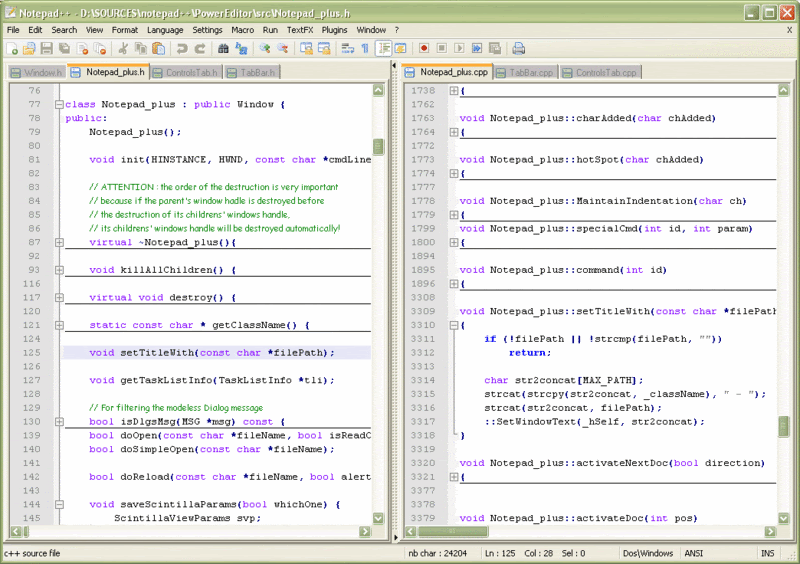
My main use for text editors happens to be some fairly simple html coding for my blogs. Even though Windows has its own, Notepad, it's fairly lame, so it behooves you to find one that better meets your needs. For a while now I've been using kewlpAd, just because it's skinnable. But it has very few of the features I need. So I'm movin' on up to the big time. The free editor called Notepad++ is my new app of choice for this particular need.

Its features include:
  • Syntax Highlighting and Syntax Folding
  • WYSIWYG
  • Auto-completion
  • Multi-Document
  • Multi-View
  • Regular Expression Search/Replace supported
  • Full Drag ‘N' Drop supported
  • Dynamic position of Views
  • File Status Auto-detection
  • Zoom in and zoom out
  • Multi-Language environment supported
  • Bookmark
  • Brace and Indent guideline Highlighting
  • Macro recording and playback
Click here to get it!

Thursday, March 29, 2007

Brandy (You're a Fine Girl): Boost Your Readership with BrandMyBlog

You may not be old enough to get that reference; that's OK. It's from a 1972 hit song by Looking Glass. And it has nothing whatsoever to do with the subject of this post, except for the word brand, as in brandmyblog.com, which provides a means of boosting the readership of your blogs in a few minutes by adding a small roll on your blogs sidebar. Mine looks like this:


Here's what they do:

"The idea is simple; we provide a free opportunity for you being a blogger to refer your readers to other blogs which publish something related to your own blog. In return, you get more interesting content on your blog, and you get your own posts exposed on thousands of other blogs similar to yours. Our blogroll includes 3 blog-resumes which means that every time a person load a page on your blog, you get your own blog-resume shown at 3 other blogs all around the world."

If you're a blogger looking to boost your readership, give them a gander by clicking on the graphic below. Let me know what you think by leaving a comment.

Wednesday, March 28, 2007

Better than Ever: Google Updates Free Google Pack

Folks, it's time to check out the new and improved Google Pack. This free software pack (you can choose to download them all, or pick the ones you want) comes with Google Earth, Picasa, Google Photos Screensaver, Firefox with Google Toolbar, Norton Security Scan, Google Desktop, Google Toolbar for IE, Adobe Reader, and Spyware Doctor. You also have the option of adding Google Talk, RealPlayer, Skype, Google Video Player and Gallery HD Images. This really is a great bucket of cool applications. According to Google's official blog:
Google Pack makes it easy to setup and protect your PC, and now we've added two new applications to make your PC even safer: Symantec's Norton Security Scan, which detects and removes viruses, and PC Tools' Spyware Doctor Starter Edition, a top-rated anti-spyware utility. Both are free and include automatic protection updates with no paid subscription required.

We've also substantially updated our screensaver. Now you can turn your computer into a digital picture frame that displays pictures from photo feeds—continuously updated streams of photos from the web. Many of your favorite photo-sharing sites support them already, so it's easy to keep in touch with your friends and family this way.

Click on the graphic below to get your new and improved Google Pack today!

Tuesday, March 27, 2007

Emoticons that Use (Insert your face here)

If you don't know what emoticons are, you may know them as "smiley faces." They are those little faces we insert into our emails or IMs that help the recipients know how we are feeling. They enable us, for instance, to write as if we are burning with a ferocious wrath (which we are), but soften the flames with a cute smiley. Or whatever expression you want to convey. Emoticons began with simple combinations of keystrokes that stood for an emotion, like :-) for happy, or >:-( for angry, or *-[+}} for existential angst. Pretty soon, technology advanced to the point where we could insert more realistic faces, little round yellow things that looked like the faces of little yellow people.

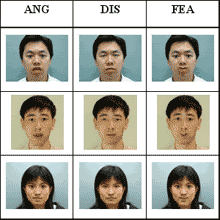
A new advance in the science of emoticons is upon us, however. U. Pittsburgh computer scientists have developed software that will let you use emoticons based on a picture of your own face. (I know, I know, but at least they're not busy making a doomsday machine.) Just one generic, expressionless photo of your ugly mug can be manipulated to look happy, sad, mad, lustful, bemused, dumbstruck, solicitous, stupefied, whatever! So keep your eyes open and your ears to the ground, 'cause this thing's coming soon.

Vista? We Don Need No Stinkin Vista

For those of us who see no compelling reason to upgrade to Vista, at least until it's time for brand spanking new machine with at least 4 Gigs of memory and graphics power out the wazoo, and are quite happy with XP, thank you very much, there are small programs that allow us to have some of Vista's more attractive eye-candy. For example, there's a little app called Visual Tooltip 2.1. With Visual Tooltip running, you get a nice thumbnail view of your minimized windows when you mouse-over them in the taskbar (the thingie that sits at the bottom of your screen). Here's what it looks like.


Why go through the hassle and cost of a Vista upgrade? If it ain't fixed, don't break it. You can get all the love with little apps like Visual Tooltip! Get it here.

Monday, March 26, 2007

Ladeees and Gentlemen, Choose Your Start Page

Lifehacker's Rick Broida puts together a great article on choosing the best start page for your browser. You know, it's the page that comes up when you first open your browser in the morning (or whenever you open it, it doesn't matter...). You want (if you are a rational person) a page that has everything you want to look at to start your browsing day. News the way you like it, weather, sports, feeds, email, etc., all arranged to suit your tastes. There are basically 5 big dogs in this hunt: Google, Netvibes, Pageflakes, Windows Live and Yahoo. Each allows you to personalize a start page with the elements you want and some nifty gadgets to boot.

Thanks to Rick, we don't have to try them all. We only have to check out his ratings and comments, then choose which one you think will work best for you. As they say on the tube, "Ask your doctor if (insert cool drug name here) is right for you." Rick chose Netvibes as the best. So I'm giving it a try.

Click here for the original article.

Sunday, March 25, 2007

Making the Web Your Bitch

(Sensitive readers, please substitute "Making the Web Work for You" for the title of this post.)

I do a lot of research on the web. A lot. Some of what I find, I use. And some of what I use (or plan to use), I want to keep. How to do that? The answer, at least one of the best answers, is Diigo. With Diigo you can bookmark, highlight, annotate, collaborate and more. A scenario, if you will: You're trying to gather some useful information on a health issue. When you do a search on the topic, you run across some pages that have a useful paragraph or two. But how can you keep a record of all these pages, and how do you isolate the specific paragraphs you want, and then how can you send the useful parts to someone else? Diigo does it all. You simply highlight the paragraphs you want, click the Diigo button on your Diigo toolbar, then hover your mouse over the highlighted section. Then you can create a stick note that will come up when you mouse over that section. Say whatever you want about it.

There's so much more you can do. You can create a group of people who are researching a topic together so that you can collaborate. You can easily blog the information you're finding. You can tag your information for easy searching. You can archive it, make it private or share it with the world. The list goes on. Diigo is an excellent tool to have in your toolbox for making the most of what the web has to offer. Get it here!

Saturday, March 24, 2007

Hide Me from the Bots!

Ever wonder how your email address got into the hands of spammers? Was it sold by a web site you entrusted it to? Possibly. But there's another way it could have happened. Spammers use email harvesting software called harvesters or harvesting bots to scan web pages, forum postings mailing list archives and the like. When they find them, they harvest them. If you've got a web site or blog with your email address on the page, it will be assimilated. Resistance, as they say, is futile. Or is it? Here's a way to hide your email address from the bots but show it for your friends. It's an email icon generator. It not only creates an icon that the bots can't read (yet), the resulting icon also looks pretty cool. Here's a sample:


This generator will let you make an icon for GMail, Hotmail, MSN, Yahoo!, AOL and many more.

Free & Forever

I've recommended free Internet security software to you before; antivirus here, antispyware there, and so on. Well, here's an entire suite of security products offered by Comodo: Firewall, Anti-Phishing, Antivirus, Antispam, Backup, Password Manager, all great products, all free forever. Can't beat that. They make their money selling stuff to enterprises. The little guy home user gets a pass. Isn't that nice? The products can be downloaded and installed individually, so you can get one or more or all of them. Enjoy them by going here.

Thursday, March 22, 2007

The Wait is Over!

For Yahoo! Widgets 4 that is. Some very nice new features make this a great update to an already excellent product. Widgets are objects with various types of functionality that sit on your desktop and pull information from the Internet without you having to search with your browser for it. Everything from weather to games, from calenders and to-do lists to sports scores, are available among thousands of widgets, and new ones are being created every day. The new Widget engine adds a nice new dock to help you organize your widgets. Check it out here.

Wednesday, March 21, 2007

Nothing Much to Say? No Problem Mon.

Are you a would-be blogger? You'd blog, except for the fact that you don't want the heavy lifting that goes with blogging...mainly the obligation to post something extraordinarily witty on a daily basis, as well as the imagined or real learning curve associated with designing your blogging web site. Perhaps you've started a personal blog but waved the white flag somewhere down the road for essentially the same reasons.

On the other hand, you might feel as if you're missing out on the opportunity to record your admittedly infrequent but nevertheless important ideas, or share some cool stuff you've found on the web with your friends. Well guess what. You can do those things without...hear me now, I said without the hassles! That's right. It's been made possible by a site called Tumblr.

With a Tumblr tumblelog you can post all different types of media you find on the web, and you can do it in the time it takes you to say...well, anything short. Visit the Tumblr site here.

Tuesday, March 20, 2007

Live TV (and More) on your Google Home Page

Thanks to Lifehacker for these tips: If you aren't using a personalized Google home page, you might orta. Google has a cornucopia of gadgets available that together can make your Google home page the be-all and end-all of web pages. I was just now convinced to make it my default page for my Firefox installation.

The particular tips coming in recently have to do with adding live TV and new, fun themes to the Google page. There are already all kinds of gadgets, like various types of news, weather, date and time of day, Google calendar, to-do lists, etc. In just a few minutes you can make your Google home page a one-stop spot for instant information on everything you care about. Well, almost everything. Let's give them a few more months to make it literally everything.

Click here to go to the live TV page.

Monday, March 19, 2007

Excel-ent Dinners!

I found this little gem at juiceanalytics. If you love Excel and eating like I do, then this Excel workbook is bound to make you happy. Unless you have TV dinners (are they still called that?) every night, or are so well-off that you can afford to eat out all the time, you will face the challenge of trying to figure out what you're going to have for dinner. Most people seem to come to this little sticking point on a weekly basis in order to avoid having to go to the grocery store several times a week. In my family my wife works as a teacher (and you know how inflexible that work schedule is), while I work from my home office. So I'm the one who typically visits the store. So I wouldn't mind some technological help figuring out what to get. Enter Cathy's Recipe Manager! She's made it available to anyone, so download and share it to your heart's content.

It works in a simple 3-step process:

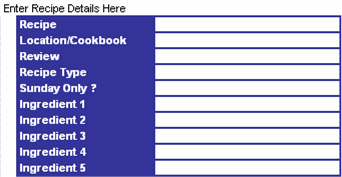
Step 1: Use the handy recipe input sheet to add new items to your list. Tip: Only add ingredients that you don’t normally stock.


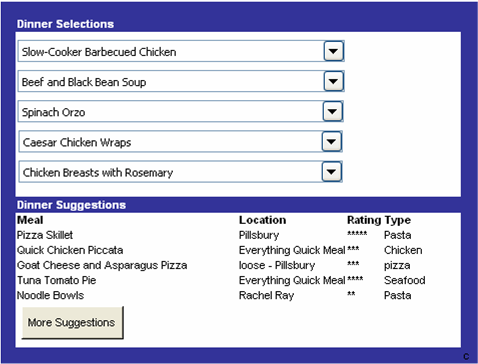
Step 2: Select from drop down lists of dinner options–one for each day of the week. The dinner suggestions area at the bottom randomly selects a set of recipes to provide some fresh ideas.


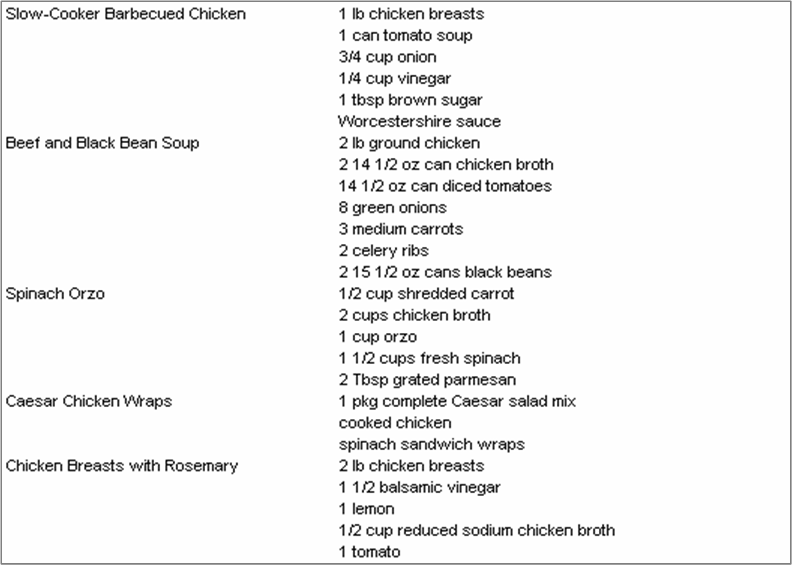
Step 3: Print out your automatically generated shopping list.


The Recipe Manager comes with a few recipes pre-entered, but you can change them and enter your own recipes as much as you want. Bon appetit!